I am not bore
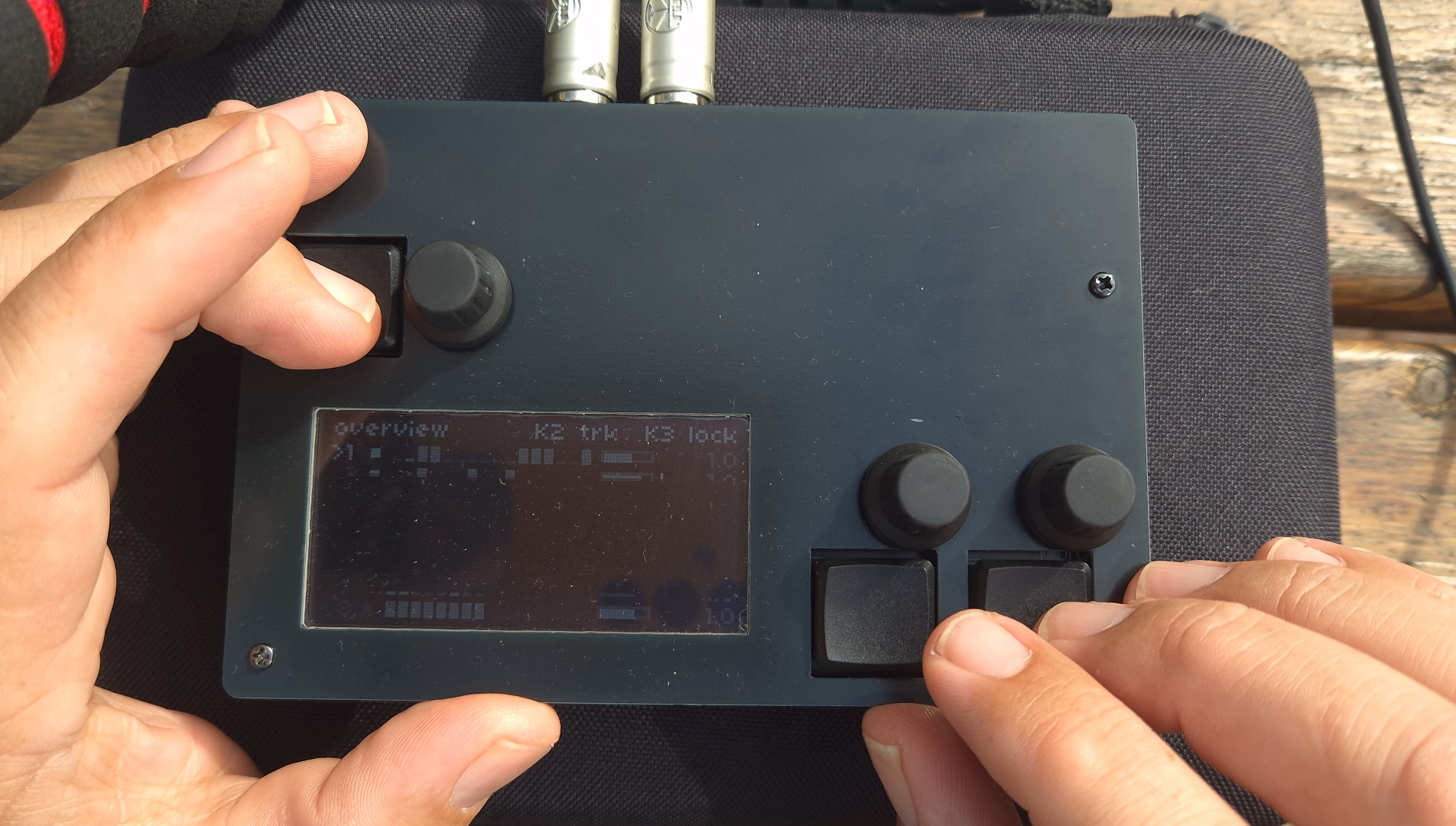
Building a norns music instrument based on ideas from Turing machine and Kastle WaveBard.
A note before we start: this writing is not about politics at all. It’s about creativity. Okay?
The idea
What if you built a musical instrument out of the silences in a speech? Not the words. Not the arguments or the applause lines. Just the pauses — the breathing in and out, the smacks, the little room sounds that happen when the speaker isn’t trying to say anything at all. What if you took those meaningless in-between moments, turned them up to full volume, and played them like a drum machine?
That’s what this project is. Here’s how I got there.
Note: If you do not want to read the whole text about why and how I did it you can start with watching the end result here: https://youtu.be/eb4nVKxmRVk
Where it started
The other day I was watching the White House Correspondents’ Dinner on YouTube. That event is always quite amusing, because the President of the USA gets to tell some jokes and share a cool-down moment with the journalists whose job is to keep an eye on what he and his administration are doing. For at least an hour, both sides can bury the hatchet, set their roles aside, and just have a laugh together.
I thought it would be interesting to see what the current president, Donald J. Trump, would have to say when he’s not talking about his usual politics. I’ve watched the last few presidents do this, and it has always been quite amusing.
This time, though, it kind of turned into a political speech as well. The jokes he was asked to deliver obviously weren’t written by himself — and from the way he read them, they may not even have been proofread by anyone, nor rehearsed. That didn’t hide the fact that this was just for show: something that had no real purpose other than “tradition,” a thing that has to be done. It was a 101% full-on ad-hoc delivery, and normally that’s actually one of DJT’s strengths when speaking to his crowd — the ability to wing it. But this time it wasn’t really working out. He bombed, and hard. Unfortunate.
I can be transparent and say that I oppose most, if not all, of his views. Let’s leave it at that. But what does this have to do with creativity?
Listening to what isn’t said
My interest in leaders — political, religious, and so on — who have the “gift” to convince other people of their own beliefs goes back more than 35 years. I’ve always been intrigued by what makes them stand out from others, and I’ve done my own creative research into the fundamentals of how they do it, sometimes turning that into creative works or art commentary. There are thousands of studies on this topic if you’re interested in how leaders use well-known techniques — pathos, anaphora, ethos, tricolon and other rhetorical stunts — to deliver whatever they want to say to the people. This time I decided to look at the speech from another angle: the things he was not saying. I thought — what if we don’t listen to what he’s saying, but instead start listening to what happens when he isn’t intentionally trying to say something? The pauses. What happens if we look at those, at their tempo, and at how much time they take up in his speeches? That’s what was really happening in between the political rants and the jokes that fell flat: the pauses. Breathe in, breathe out, room sounds, smacks.
Gathering the material
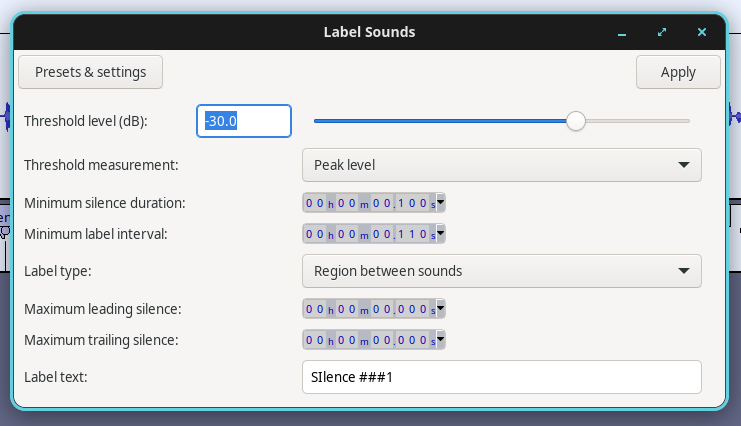
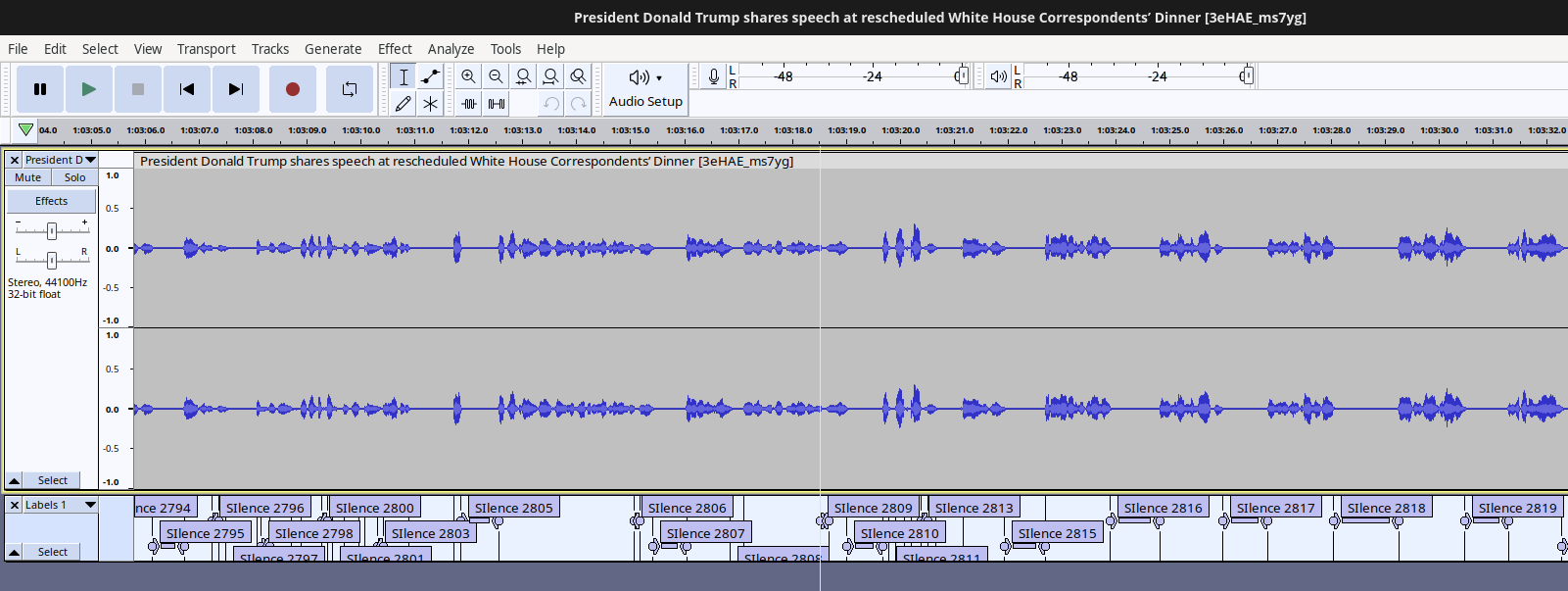
I downloaded the YouTube video (as audio) with a tool I’ve been using for a very long time, called yt-dlp. Once the file was on my hard drive, I opened it in my favorite open-source audio editor, Audacity. The next step was to have Audacity automatically find all the quiet parts and pauses for me. 35 years ago, when I did a similar thing, I spent a week manually copying and pasting these selected bits by hand in Pro Tools. This time, Audacity had a function to create labels from the sound, and I asked it to create labels for everything with an amplitude below –30 dB. That resulted in 2,871 labels. I could then have the audio editor export them to individual sound files in a folder.
Turning silence up to full volume
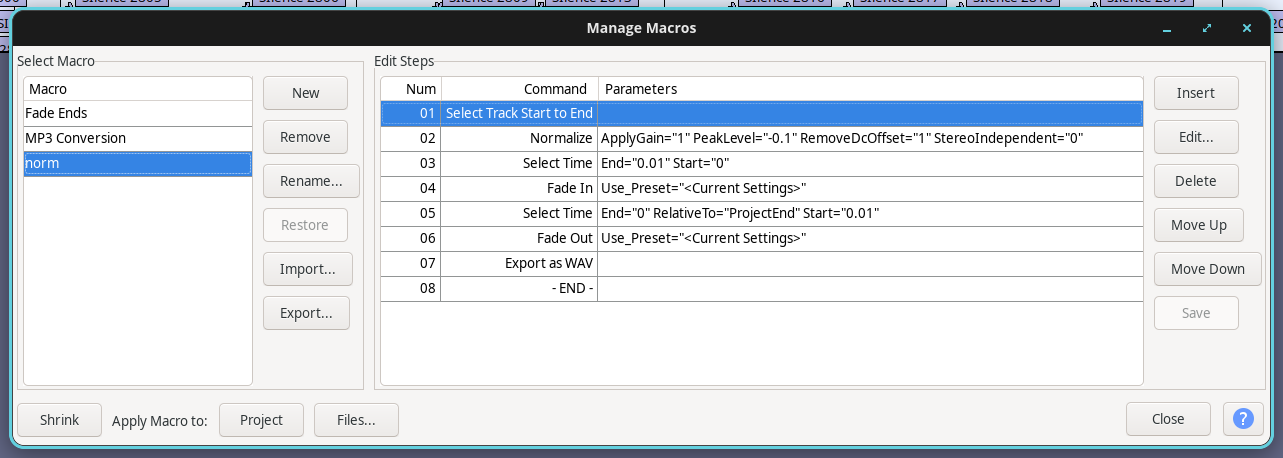
Now I have a folder of 2,871 very soft, low-volume audio files. The next step was to create a “macro” that made each sound as loud as possible (normalize to 0 dB) and trimmed the edges with a very quick fade in/out. I applied that macro to all of them. After that, every file was a strongly emphasized version of the silence between his words — as if the White House stage technician had raised the mic volume in every pause and lowered it again whenever DJT spoke.
Sorting the sounds
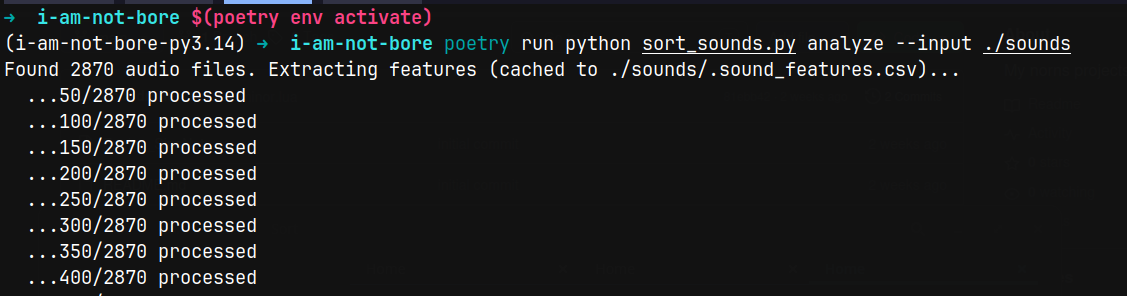
Next it was time to categorize all 2,871 sounds into groups by character, so similar sounds would sit together. This is also something I did 35 years ago, by hand — listening to each sound and giving it labels like loud, soft, short, long, noisy, pure/clean, transparent, dense, low-freq, hi-freq, and so on. Back then that process could take days or more. This time I took the liberty of using AI. I ended up with a Python script that uses AI to analyze the sounds one by one and sort them according to its analysis. I decided to go with 8 groups, so the script created 8 folders, each with its own label, and dropped the relevant sounds into each:
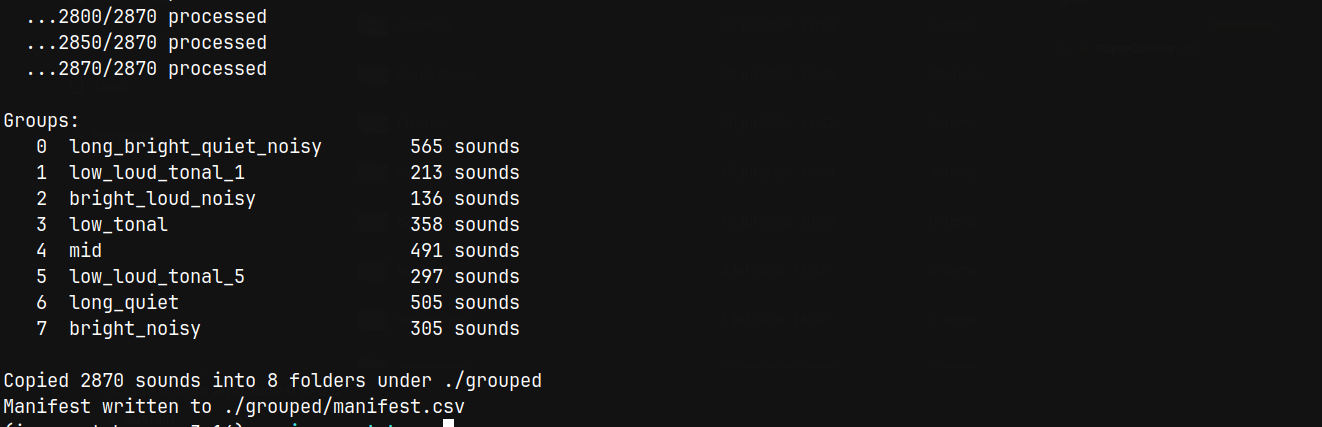
The final groups are:
- 00_long_bright_quiet_noisy
- 01_low_loud_tonal_1
- 02_bright_loud_noisy
- 03_low_tonal
- 04_mid
- 05_low_loud_tonal_5
- 06_long_quiet
- 07_bright_noisy
Why does the first folder start with 00and not 01?
Because I’m a programmer. :)
From material to music
Now that I had 8 folders of grouped, similar sounds, I started thinking about how they could be used. This is where musical creativity comes in. I could end the story right here and just say it was fun and interesting to learn how to download a YouTube video to your hard drive, use an open-source audio editor to analyze the sound and split it into many smaller sounds, create a custom macro to amplify them, and then use AI and a bit of coding to group those weird sounds by their characteristics.
But that’s not the end for me.
I have the material. I prepared it. I gathered it. I chopped it up into pieces. I grouped them into different areas. And now I need to compose with them — and I need an instrument to make the music. In this case, the composing and the performing are the same thing: it happens in real time. I want to play around with these sound files and see what happens when I take “silence,” or very soft sounds that in themselves have no meaning from the speaker, and turn that into something that has meaning for me. So I had to decide how to map this into something musically interesting. I went with rhythm and the simplest kind of audio transformation: pitch and playback direction. On top of that, I wanted to control the density of each voice — how many sounds get played in each loop — so you can go from barely-there silence all the way to a very dense, chaotic rhythmic pattern.
Building the instrument
I decided to build a project on norns — a music/art computer made by a couple of geniuses in upstate New York. You can read more about the project here: Monome Norns. The idea is that, using the programming languages SuperCollider and Lua, you code your own instruments on the computer and then perform on them with the built-in controls (3 buttons and 3 knobs), or by connecting a larger control surface so you have more controls under your hands. I’ve barely started my journey of making norns programs and instruments, and here I decided to get help from AI to guide me toward the goal I had in mind. I built an 8-channel / 8-voice random sequencer and sample player, very much inspired by the famous “Turing Machine.” I combined that with the functionality of another fun physical sample player I have, the Kastle WaveBard. Together they gave me an 8-voice sampler that plays random sounds from the 8 sound banks of amplified “silence.” Each voice can play a rhythmic pattern between 1 and 16 steps long. For every voice I can control the playback direction (forward/reverse), playback speed/pitch, density, panning and volume, and whether each sampler grabs a new random sample on every hit or stays with one sample for the whole pattern.
Playing it
The sounds you’ll hear are a lot of DJT’s breathing in and out, smacks and so on, arranged into a rhythmic pattern that I control in real time. It’s not a finished mix. Each time, I get new sounds, and each sound works best (or worst) in certain conditions alongside others. While playing, I can change every parameter above, for each voice — and that’s what makes this an instrument rather than a recording. I can also choose to play just one or a few of the 8 samplers at a time, to control the overall form and density. This is quite often how my mind works, and not just when I’m solving creativity- or art-related problems. It’s the same when I’m doing my daily work as a developer: I build the tools I need if they don’t exist yet, or I pick the right tools for a specific task, and I always want to move forward and try things out. Here I combined a set of ready-made tools I didn’t build myself — a tool to download a YouTube video, a really good open-source audio editor to split the file into many smaller sounds — with AI to analyze and group those sounds, and finally AI as an assistant to help me build my own digital musical instrument based on my existing knowledge and ideas about how it should work.
Enjoy my first go on my new instrument, called I am not bore. The name comes from one of the people attending the dinner, who reviewed it/him as:
…bore, chode & long winded…
I basically took the sound in between and instead made it not bore.
Download the source code and sounds
Everything is open source so if you would like to use it your self or change it you a free to do so - by design.
GitHub: You can find the Norns patch here: https://github.com/bobodrone/i-am-not-bore
And you can fetch the Python sorting script here: https://github.com/bobodrone/i-am-not-bore-grouping-audio
S3 storage: For the audio files I created you can get the here:
https://pennache.s3.eu-west-1.amazonaws.com/i-am-not-bore/sounds.zip